

Working on translations
To be efficient, translators should follow a certain sequence of steps
We will now cover how to do this
Overview
Step 1: Identifying the appropriate 5-6 character
ll_CClocale name for your translationStep 2: Configuring the
mappings.txtfile with a text editorStep 3: Working on main translations with Poedit
configure
Poeditgenerate and translate the “strings” in the
messages.pofile
Step 4: Translating “Start-up tips” in PsychoPy® with a text editor
NOTE: Steps 3 and 4 aren’t sequential; they’re different translation processes
Step 1: What is the ll_CC locale name for my language?
First, we need to discuss how locale names work
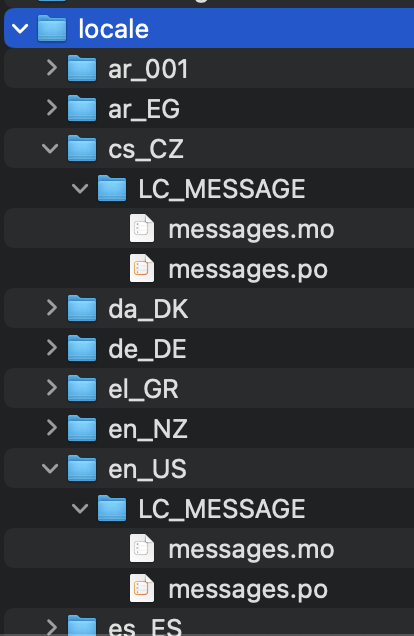
Look under this directory in your local copy
psychopy/psychopy/app/locale
Screenshot of localization files in PsychoPy®
1a: Examples of East Asian locale names
ll_ (language), followed by _CC (country), for example:
1b: Examples of Central/Western Asian/European locale names
ar_001 for Modern Standard Arabic*
he_IL for Hebrew in Israel
tr_TR for Turkish in Turkey
fa_IR for Farsi in Iran
* This is the official locale for MSA. Let’s just hope the _001 code works in PsychoPy®. If not, we can switch to country codes (e.g., ar_EG for Arabic in Egypt)
1c: Some other Indo-European languages
ca_ES for Catalonian/Valencian in Spain
de_DE for German in Germany (hochdeutsch)
et_EE for Estonian in Estonia
fr_FR for French in France
hi_IN for Hindi in India
it_IT for Italian in Italy
lv_LV for Latvian in Latvia
nl_BE for Flemish in Belgium
pl_PL for Polish in Poland
pt_PT for Portuguese in Portugal
ru_RU for Russian in Russia
1d: What if our language needs more than one language variety?
Recommendation
decide on which variety to start with
finish the translations for that variety of the language
copy, paste, rename, and adjust
1e: Example using Spanish
1f: ll_CC folder/file structure
The file translators only work on
a
messages.pofilelocated two levels under under any particular
ll_CCfolder for that locale
For example for Farsi (Persian) in Iran:
psychopy/psychopy/app/locale/...
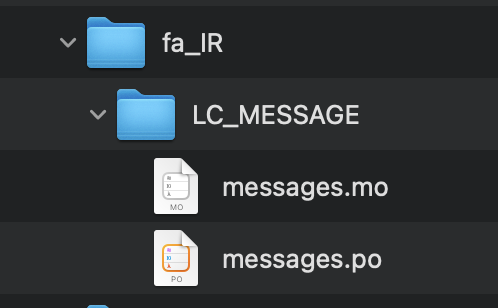
NOTE: Ignore the intermediate LC_MESSAGE level, as well as the messages.mo file underneath
1g: Is your locale listed?
Look under
psychopy/psychopy/app/localeIs your
ll_CCfolder there?may already be there
or not
if not, why isn’t it pre-listed?
unnecessary storage
pre-listing every language-country pair
storage waste
current list
just guesses
if not pre-listed, just add it
1h: How to add a locale
the easy way
find any
ll_CCfolderideally, look for a small
.pofile with no translations yet
copy and paste the entire folder
rename the folder to the
ll_CCappropriate for your localemake adjustments to the
messages.pofile underneath (covered soon)
the hard way
not a reasonable approach; not going there
Step 2: Update mappings.txt
Do this once per translated language, and it’s done forever (for that localisation)
This file allows the experimenter to choose a localization in PsychoPy®
2a: Open a text editor
Start your preferred text editor (e.g., Visual Studio Code, PyCharm, TextEdit [Mac])
Avoid using Notepad in Microsoft Windows
Use Notepad Plus instead
2b: Insert the appropriate ll_CC code
Open the following file (there’s one and only one)
/psychopy/psychopy/app/localization/mappings.txt
Is the
ll_CCcode listed?Make sure the
ll_CCcode resides at the appropriate line (alphabetically listed)
2c: Add the Microsoft language code
Add the 3-letter Microsoft code that refers to the language
These can be found in the rightmost column (
Language code) on Microsoft's list of Language Identifiers and and Locales.
NOTE: If you can’t find your language for some reason, just add a random three-letter sequence that isn’t already in use and probably doesn’t refer to a language (e.g., JJY). That should work.
2d: Add an informative language label
At the far right,
type in the language and variety in that language
followed (in parentheses) by the the name of the language and variety, in English
do not include the variety (the part after the comma) if there is only one variety that anyone would ever use
for example
“
español, España (Spanish, Spain)”(not just “
Spanish”)
“
עִברִית (Hebrew)”(not just “
Hebrew”)
Save the
mappings.txtfile
2e: Make a pull request for mappings.txt
2e1: Stage changes
Select psychopy under the tab labeled
Current RepositorySelect release under the tab labeled
Current BranchStage the
mappings.txtfile (only)go to the tab labeled
Changesmake sure that
mappings.txtis the only file with a checkmark
2e2: Commit staged changes
add the following message to the box underneath with the temporary text Summary (required)
DOCS: Update mappings.txt for Hebrew in Israel(for example)this must be 50 characters or fewer
add extra information under
Description, if necessary
click the box underneath labeled
Commit to releaseNOTE: If it’s not labeled
Commit to release, start at the top of this slide again
2e3: Push to origin
click the
Push origintab
2e4: Pull request from origin to upstream
On GitHub (origin [AKA your online “fork”])
Click
ContributeChoose
Open pull requestLeave a comment only if you think it’s necessary (it shouldn’t be for translations)
Click
Create pull request
FINISHED!! (with mappings.txt)
Step 3: Translating strings in Poedit
Poedit
where most of your work will be focused
first need to set some things up
3a: Sync all your repositories
Sync from upstream to origin
Pull from origin
Again??!!
Yes
Do this every time you start work on a translation
Another translator may have changed the translation (the
.pofile) since the last time you worked on it
Go back to the end of Setting up version control for instructions
3b: Download and install Poedit
3c: Check General settings
Start Poedit
Once set, the settings below in Poedit don’t really change
3c1: General tab (Name and email)
choose the following:
File > Preferences(on a PC)Poedit > Settings(on a Mac)
Find the following tab:
GeneralFor convenience, make sure that the box with the following label is UN-checked:
Automatically compile MO file when saving(Note that this is not strictly necessary as we have set Git to ignore the
.mofile, but compiling this file is unnecessary and takes up processing time)
3c2: Leave name and email blank
Do not provide your name or email
Doing so will list your name and email in a public place (GitHub), where it doesn’t really need to be
Instead, just leave these fields blank
3c3: check the Advanced settings
click the
Advancedtab in the same windowMake sure that the following are set correctly
Line endings:set to
Unix (recommended)
Preserve formatting of existing filesmake sure this is checked
3d: Settings specific to a .po file
First, open the .po file
File > Openfind the
.pofile for the language you’re working on:.../psychopy/psychopy/app/locale/[your ll_CC folder]/LC_MESSAGES/messages.po
For example, for Thai in Thailand:
psychopy/app/locale/th_TH/LC_MESSAGES/messages.po
3d1: language team
Go to:
Translation > Propertiesunder:
Language team(if there is more than one translator for the locale, and we have set up a Google Group for your team)make sure that the email for entire group is correct
psychopy_[language]@opensciencetools.orge.g.,
psychopy_hebrew@opensciencetools.org
3d2: language
under:
Languageselect the appropriate
Language (Country)combinationFor example
Duala (Cameroon)
under
CharsetUTF-8 (recommended)
3d3: Paths (1)
under the tab labeled:
Sources PathsFor
Base pathClick the arrow on the right
find the path on your computer that leads to the
psychopydirectory within the cloned repository on your computer:
..THE/PATH/ON/YOUR/COMPUTER/TO/psychopy/psychopy
NOTE: This setting does not make its way into the .po file. Rather, it’s just part of Poedit.
3d4: Paths (2)
under the tab labeled:
Sources Paths…in the box labeled:
Paths…there should be a dot (
.)
3d5: keywords
under the tab labeled:
Sources KeywordsGo to:
Additional keywords
The following keyword should be in that box (with the preceding underscore):
_translate
If it isn’t, type it in
Save your work (
File > Save)
3e1: Generate current list of translatable strings
The elements you can translate are called strings
This process is straightforward if you are the sole translator on the language
But translation teams can run into merge conflicts
In such cases, make sure that you reduce the chances of merge conflicts by doing the following
synchronise your repositories
establish a team strategy (covered after the next slide)
3e2: Generate the list
Choose:
Translation > Update from Source CodeYou should subsequently see a list of strings in English that need translating into your language
If you don’t, the keyword
_translatemay not have been added to the keywords (see above)
NOTE: If Update from Source Code is greyed out, there are probably no new strings to update
3g: Group strategy: Sort and show string ID
This is for collaboration in a team, after the strings are updated
Choose:
View > Show String IDChoose:
View > Sort by File Order
If you do both of those, then the strings will be listed in order by index
The index
IDcan be seen in the column at the far rightTeams can divide up the work by
IDranges, for exampleTranslator A: IDs 1-250
Translator B: IDs 251-500
etc.
3h: Translate the strings
Look at the list under the heading:
Source Text - Englishat the upper leftSelect a string that you want to translate
Once selected, you should see it appear as English in the following box below the longer list:
Source text(at the lower left)Below that, there is a box labeled as follows:
TranslationType your translation into that box
Save your work as you go
3i: Make a pull request for messages.po
This involves several steps, described next
3i1: Stage changes
Select psychopy under the tab labeled
Current RepositorySelect release under the tab labeled
Current BranchStage the
messages.pofile (only)go to the tab labeled
Changesmake sure that
messages.pois the only file with a checkmarkif the
.mofile is checked, UN-check it
3i2: Commit staged changes
add the following message to the box underneath with the temporary text Summary (required)
DOCS: Add translations to Modern Standard Arabic(for example)DOCS: Add translations to Simplified Chinese(another example)(again, must be 50 characters or fewer; add extra information under
Description, if necessary)
(ignore the box labeled
Descriptionfor now)
click the box underneath labeled
Commit to releaseNOTE: If it’s not labeled
Commit to release, start at the top of this slide again
3i3: Push changes to origin
click the
Push origintab
3i4: pull request to upstream
On GitHub (origin [AKA your online “fork”])
Click
Compare & pull requestMake sure it says Able to merge in the box at the top
Leave a comment only if you think it’s necessary (it shouldn’t be for translations)
Click
Create pull request
Note A: Leave certain technical terms alone
Technical terms should not be translated:
BuilderCoderPsychoPyFlowRoutineand so on
These are usually indicated with an uppercase first letter
Check the Japanese localization (
ja_JP/LC_MESSAGES/messages.po) if in doubtThe Simplified Chinese
.pofile also has some examples
Note B: Formatting arguments
If there are formatting arguments in the original string (%s, %(first)i)
The same number of arguments must also appear in the translation*
If they are named (e.g.,
%(first)i)(here,
firstis a python name)that part should not be translated
Again, refer to the Japanese localization if in doubt
(and/or Simplified Chinese, if you are in that language)
* Word order changes across languages, of course. So the placement of these formatting arguments within the translated string may differ from the US-English string.
Note C1: Using the Japanese .po file for guidance
The Japanese translation is nearly complete
You have it since you forked and cloned the repository
Open:
/psychopy/app/locale/ja_JP/LC_MESSAGES/messages.po
Look up the string you’re having difficulty with in the Japanese
messages.pofileUse that as a model for your own
.pofile(and/or Simplified Chinese, if you are in that language)
Note C2: When you are unsure how to translate
If you think your translation might have room for improvement
toggle the button labeled as follows:
Needs WorkIt should be located to the right of the header with the following label:
Translation
You can also add notes to clarify
Click the button with the following label:
Add CommentThis should be located at lower-right of the app window if you have the sidebar visible
Add your notes for that string into the pop-up window
Note C2a: Simple strategy to resolve uncertainty: Ask the experts
Go to the PsychoPy Forum
There are friendly, useful experts there
When posting
select Development under
Categoryadd the tag translation
How people on the Forum might help you
Few, if any, can help you with your language, of course
Many more who can help you understand the underlying code of PsychoPy®
Note C2b: Advanced strategy to resolve uncertainty: Determine it yourself
NOTE: You need to understand Python quite well to take the following approach
Select the relevant string in the following box:
Source text - EnglishRight-click the string (control-click on a Mac)
At the bottom of the pop-up window, you should see the following heading:
Code OccurrencesBelow that, you will see the (partial) path(s) to the file(s), followed by a colon,
:, then the respective line number in the file
Note C2b (cont’d)
For example, for the string
Yesin one version of PsychoPy®:../app/connections/update.py:232(meaning line 232 in theupdate.pyfile under theconnectionsfolder)../app/dialogues.py:51(meaning line 51 in thedialogues.pyfile under theappfolder)../app/dialogues.py:71(etc.)
You can then go into that file (or those files) to determine the function
Note C2c: Last resort: Do nothing
If still in doubt
Just leave out the translation until you do understand
There is nothing wrong with this approach
It is, by far, preferable to mis-translating a string
If you see fit to do so, toggle
Needs Workand add a comment (see above)
Step 4: Translating the Start-up Tips
Start-up tips are not handled directly in a
.pofileRather, they are stored in a
.txtfile, one per languageThat
.txtfile is then referred to inside the.pofile for your languageThis is explained next
4a: Copy tips.txt to a new file
Find the default Start-up Tips (in English) file
psychopy/app/Resources/tips.txt
Copy it
Paste it as a new file (
tips copy.txt, perhaps)Rename it according to the
ll_CCconvention consistent with the language you’re working on
For Example
tips_zh_CN.txt(simplified Chinese)tips_ar_001.txt(Modern Standard Arabic)
4b: translate
Open the new, renamed
tips_ll_CC.txtfile using your preferred text editor (as long as it opens up the file with each tip on a new line, unlike older versions of Notepad)Translate the English-language tips by replacing them entirely with those of the language you are working on
WARNING: Do not delete any English entry in the new .txt file before you have completely translated it. Instead, insert the relevant translation below the English entry. Then (and only then) delete the English entry. Save your work, of course.
4c: treat the .txt files as strings in Poedit
Open Poedit
Find the
tips.txtstring under the following heading:Source text - EnglishSimply provide the name of the new
.txtfile that you just created as the translation fortips.txtNaturally, this would be under the following heading:
Translation - [your language]
For example:
|
|
|---|---|
|
|
4d: Make a pull request for .po and .txt files
There are two files this time
4d1: Stage changes
Select psychopy under the tab labeled
Current RepositorySelect release under the tab labeled
Current BranchStage both the
messages.poand thetips_[ll_CC].txtfile (e.g.,tips_tr_TR.txtfor Turkish)go to the tab labeled
Changesmake sure that the following two files are checked
messages.potips_tr_TR.txt(using Turkish in Turkey as the example)
IMPORTANT: Again, be sure to UN-check the .mo file if it is checked.
4d2: Commit changes
Commit these changes
add the following message to the box underneath with the temporary text Summary (required)
DOCS: Add some startup tips to Spanish in Mexico(for example)must be 50 characters or fewer
add extra information under
Description, if necessary
click the box underneath labeled
Commit to releaseNOTE: If it’s not labeled
Commit to release, start at the top of this slide again
4d3: Push changes to origin
click the
Push origintab
4d4: pull request to upstream
On GitHub (origin [AKA your online “fork”])
Click
ContributeChoose
Open pull requestMake sure it says Able to merge in the box at the top
Leave a comment only if you think it’s necessary (it shouldn’t be for translations)
Click
Create pull request
Note on humor in Start-up tips
Some of the humor in the Start-up tips might not translate well
Feel free to delete humor that would be too odd
or replace them with mild humor that would be more appropriate
Humor must be respectful and suitable for using in a classroom, laboratory, or other professional situation
Don’t get too creative here
If you have any doubt, it is better to leave it out
It goes without saying that you should avoid any religious, political, disrespectful, or sexist material
Done with translating
More details on More information on Git workflow